Holiday Special
For Less Than $10, Get PLR Rights to 3 GPTs That
Create Complete Webinar Funnels, Presentations, And Content + Drives Free Traffic, And Nurtures Your Leads in Seconds!
This GPT trio takes your idea and builds the whole webinar funnel, delivery, and promo machine for you.
Hey there,
You love sharp webinar ideas, but the funnel grind keeps killing your momentum.
Webinar Funnel Architect takes that pressure off. Drop in one idea and a rough offer. It shapes a complete webinar journey around that seed. A focused GPT trio builds funnel, presentation, promotion, and nurture as one connected system.
Use it when you want a new webinar, a relaunch, or a cleaner existing campaign. You answer simple questions about topic, audience, offer, and traffic sources. It maps discovery, registration, reminders, live delivery, replay window, and follow-up in one clear view. Every asset supports one main promise, so people understand exactly why attending now matters.
Outputs arrive structured, labeled, and ready to paste into your existing tools. You can run them as written or tune the language for your brand. Either way, you stop rebuilding pages, emails, and slides from nothing every single launch.
Why I Created 'Webinar Funnel Architect'
Launches kept stalling for smart marketers with great offers. They had strong products, warm audiences, and lists ready to hear from them.
Yet webinar plans dragged on while other priorities jumped the queue. Funnel planning soaked up their energy long before promotion started.
Nobody wanted another tangle of documents, half-finished pages, and missing emails.
Some shipped thin funnels that never maximized registrations, attendance, or sales. Others delivered value packed sessions and then stumbled through the pitch moment.
Agencies and freelancers helped sometimes, but often missed nuance around market, pricing, and awareness. Campaigns underperformed and never reflected the real strength of the offer.
Webinars should feel like a guided path instead of an improvised patchwork.
The journey from first click to decision deserves intentional structure, not random guesswork.
So I designed a system that plans the path and writes the assets together. It handles strategy and flow while you focus on content, proof, and delivery.
Who Benefits From 'Webinar Funnel Architect'?
Webinar Funnel Architect serves experts who want webinars driving growth, not draining bandwidth. They value leverage but cannot waste weeks planning each campaign. They keep creative control while the system manages flow, messaging, and timing.
Course creators and coaches can turn signature frameworks into lean webinar funnels. Those funnels point cleanly into their main coaching programs or digital products.
Consultants and service providers can host authority webinars that lead naturally into booked calls.
Agencies can standardize builds while tailoring hooks and stories for each client.
Business owners with scattered trainings and demos can unify everything into one clear entry webinar.
Newer creators who understand their audience but freeze on structure get a confident starting point.
Strategic operators managing several brands can rely on one architecture across projects.
Feed it new ideas, approve outputs, and roll out webinar funnels whenever opportunity appears.
See How 'Webinar Funnel Architect' Works
Before Step 1 — Lock in what you actually want built.
Webinar Funnel Architect starts by asking what you want help with right now.
You can choose a focused asset or have it build the full webinar funnel for you.
Step 1 — Capture the essentials of your webinar and offer
Next, it gathers the core details that every strong webinar funnel needs. You share title, core promise, date, time, and timezone, plus whether the session is live, evergreen, or hybrid.
You describe your audience, their main pains, your traffic sources, and whether that traffic is cold, warm, or hot. You also define the offer you will pitch, price, guarantee style, goals for registrations and show-up rate, and when the pitch starts.
Step 2 — Shape your outline and teaching flow
You provide a simple outline with at least three key teaching points. Webinar Funnel Architect tightens that outline so the content leads naturally into your offer instead of drifting.
It makes sure your promise, teaching points, and call-to-action all connect. That way, your webinar feels like one intentional journey, not separate ideas thrown together.
Step 3 — Decide how deep each asset should go
Behind the scenes, it looks at traffic temperature, offer price, and audience awareness. Based on those three levers, it chooses whether your copy should be lean, standard, or long form.
Shorter assets support warm, low-friction offers, while deeper copy supports colder traffic or higher-ticket commitments. You never have to guess how much explanation each piece needs.
Step 4 — Map hidden objections before writing a word
Before it writes copy, it quietly outlines likely objections your audience will have. It considers doubts about fit, time, price, trust, and webinars in general.
If you want, you can feed it your top objections directly, and it folds those into the strategy. That objection map then guides headlines, bullets, body copy, FAQs, and follow-up angles.
Step 5 — Build your registration page around one clear promise
With strategy locked, it writes your registration page from top to bottom. You get a big promise headline, a clarifying subheadline, a short credibility snapshot, and a section explaining what they will discover.
It adds three to seven concrete bullets, “this is for you if” criteria, optional “not for you if,” logistics, and a strong call-to-action. It also gives you multiple headline options so you can test different hooks.
Step 6 — Write your reminder sequence and show-up booster
Next, it creates a full reminder sequence designed to lift show-up rates. You get a confirmation email, day-before reminder, same-day reminder, one-hour-before reminder, and a “we’re live” alert.
Each email includes two subject line options, one main angle, and a clear click-through invitation. It then writes a dedicated show-up booster email that highlights why attending live actually matters for them.
Step 7 — Build your replay sequence to recover missed revenue
If you offer a replay, it drafts at least three replay emails. You get a “replay is ready” announcement, a “what you missed” recap, and a final-chance or replay-closing message.
For stronger urgency, it can add a fourth deadline email when that fits your strategy. Each replay email includes two subject lines, one emotional angle, one specific reason to watch now, and a direct replay link.
Step 8 — Craft your webinar pitch transition script
Then it focuses on the most fragile moment in your webinar: the shift from teaching into offer. It writes a spoken transition that thanks attendees, restates the core problem, and bridges into the need for deeper help.
You introduce your offer as the logical next step, not a jarring gear change. The script previews the transformation before you unpack details, so the pitch feels like a continuation of value, not a sudden switch.
Step 9 — Create your FAQ and objection-handling bullets
Webinar Funnel Architect turns those earlier objections into clear, respectful answers. It writes a FAQ section you can use on your registration page, sales page, or follow-up emails.
You also get objection-handling bullets you can drop into slides, emails, or live answers. That way, your audience feels seen, understood, and supported instead of pushed.
Step 10 — Suggest tests, tweaks, and next runs
To finish, it recaps your funnel pieces and surfaces simple optimization ideas. You get testable variations for headlines, subject lines, and replay hooks, matched to your traffic and offer.
You can ask it to tighten specific sections, rebuild certain assets, or adapt everything for your next webinar. The same structure can run again and again, while your copy and strategy keep getting sharper.
Value: $497
It's Easy... Whether you already have webinar content, or not... You Chose Where You Want To Start...
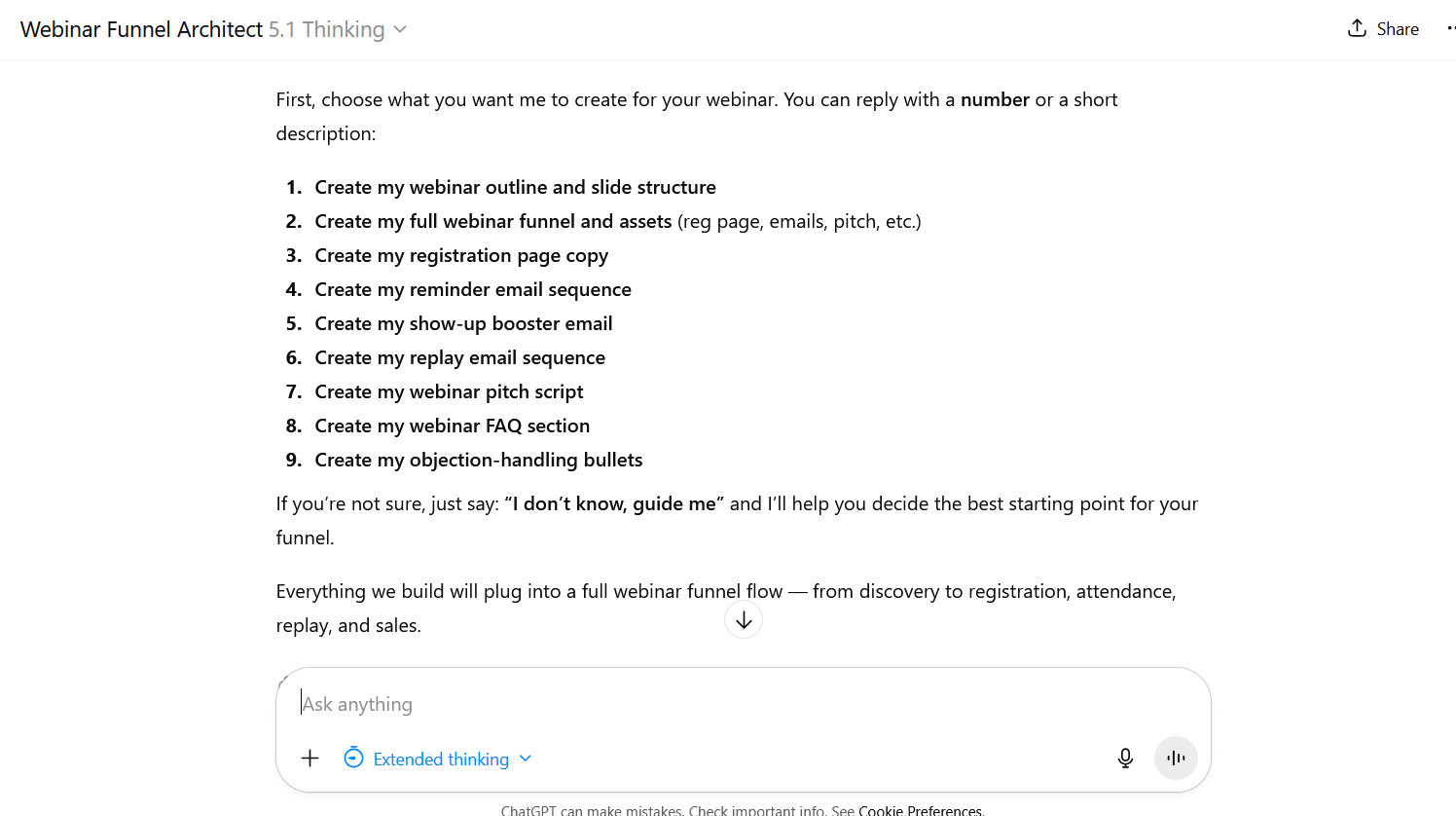
... And It Guides You Until Completion!
But that's not all...
Take Action Now and Get 5 Powerful Bonuses to Boost Your Results
Bonus #1
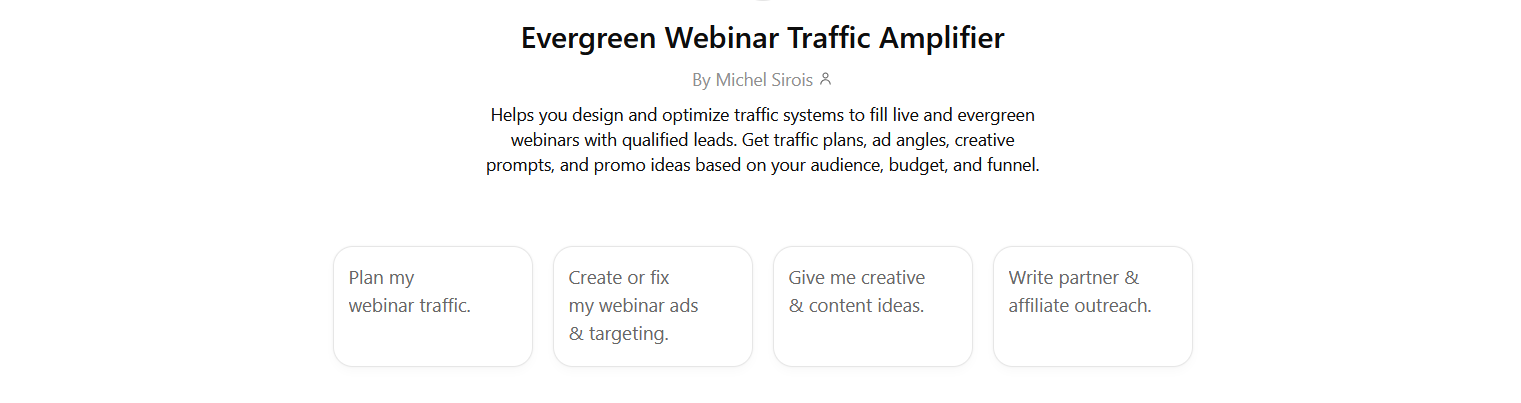
Evergreen Webinar Traffic Amplifier (Premium GPT)
Here is how Evergreen Webinar Traffic Amplifier builds a traffic system around your webinar, step by step.
Step 1 — Choose your traffic mission
First, it asks what you actually want help with for this webinar.
You pick one clear focus: full system, scaling, promo calendar, or fixing a specific performance issue.
Step 2 — Capture your webinar and traffic essentials
Next, it gathers basics like webinar type, topic, offer, and ideal audience description.
You share main platforms, budget or “content only”, KPIs, schedule, and any registration or funnel links available.
Step 3 — Sync with your funnel and positioning
If your assets came from Webinar Funnel Architect, it scans them for promise, audience, objections, and proof elements.
All traffic hooks, angles, and examples then mirror that existing positioning instead of inventing a new message.
Step 4 — Build your audience and targeting matrix
It breaks your world into cold, warm, and hot segments across your chosen platforms.
For each segment, it notes intent level, best channels, and how they currently relate to your brand.
Step 5 — Craft hooks and traffic angles
Then it turns your webinar promise into concrete hooks around problems, desires, proof, and your method.
Those hooks become reusable angles for ads, emails, social posts, and partner promotions driving registrations.
Step 6 — Design your channel-by-channel plan
It maps how each traffic channel will support the webinar, from discovery through registration and reminders.
You see which campaigns hit cold audiences, which retarget engagers, and how budgets split between them.
Step 7 — Outline campaigns, ad sets, and creatives
For each recommended platform, it suggests a simple structure of campaigns, ad groups, and creative variations.
Budgets are suggested as percentages, plus where to test new ideas without blowing your entire spend.
Step 8 — Generate ad copy skeletons and creative prompts
It writes flexible ad skeletons with headline ideas, opening hooks, and short body structures for each angle.
You also get clear visual prompts for images, carousels, and short-form videos tailored to each platform.
Step 9 — Build your content and promo calendar
It lays out at least one full promo cycle with specific content types on specific days.
Educational posts, direct invites, stories, and clips are all scheduled to keep registrations flowing steadily.
Step 10 — Plan partner outreach and optimization
It suggests ideal partners, simple outreach scripts, and swipe-style blurbs they can share with their audience.
Finally, it defines key KPIs, review rhythm, and simple tests so you keep improving results over time.
Used alongside Webinar Funnel Architect, it becomes the traffic engine that keeps your webinar funnel consistently filled.
Value: $297
Take A Sneak-Peek!
Bonus #2
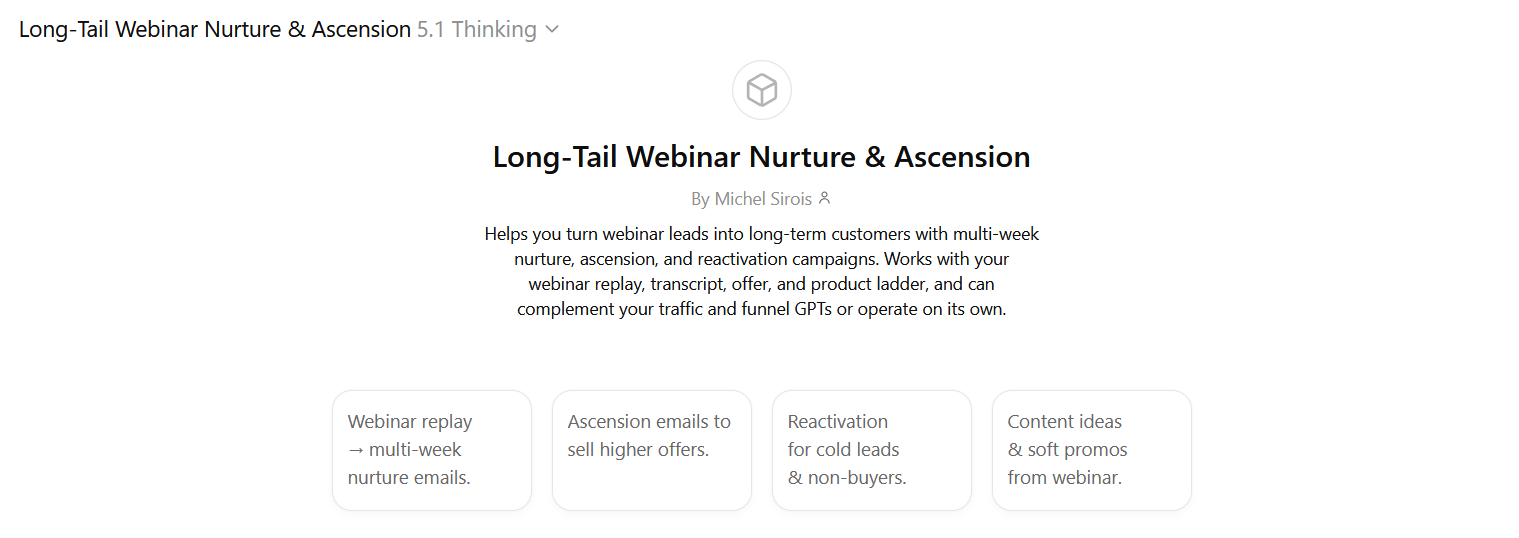
Long-Tail Webinar Nurture & Ascension (Premium GPT)
Here is how Long-Tail Webinar Nurture & Ascension GPT builds post-webinar revenue systems, step by step.
Step 1 — Clarify your post-webinar success goal
First, it asks what “winning” looks like after your webinar is over. You choose priorities like more core offer sales, more upsells, more booked calls, or reactivating old leads.
Step 2 — Gather your webinar, offer, and ladder details
It then collects what you already have: replay, transcript or outline, core offer, and bonuses. You also define your product ladder, audience, pains, objections, and any tags or segments inside your system.
Step 3 — Map segments and timing across the lifecycle
Next, it separates people into groups like attended, left early, no-show, replay, buyers, and non-buyers.
It pairs each segment with timelines like hot window, long-tail nurture, and reactivation after going completely cold.
Step 4 — Design your nurture, ascension, and reactivation strategy
Before writing emails, it outlines which sequences you actually need and how long they should run.
You see a simple week-by-week map showing themes, story types, and core calls-to-action for each phase.
Step 5 — Turn your webinar replay into multi-week nurture emails
It converts replay insights into multi-week nurture sequences that keep leads warm without constant hard pitches.
Each email gets a subject line, clear story or lesson, and a natural bridge back to your offer.
Step 6 — Build ascension flows into higher-level offers
For buyers and engaged non-buyers, it designs sequences that invite them into your next logical step.
Those flows move people from entry or core offers into memberships, continuity, or higher-ticket programs respectfully.
Step 7 — Reactivate cold leads and non-buyers gracefully
For older, inactive leads, it creates light reactivation campaigns instead of aggressive sales blasts.
They use quick wins, refreshed hooks, or new webinar invites to re-engage interested people and release the rest.
Step 8 — Spin ongoing content and soft promos from your webinar
It pulls stories, objections, and frameworks from your webinar to power newsletters, posts, and short videos.
Those pieces keep you visible while softly pointing back to your main offers and future webinars.
Step 9 — Format everything for your email and automation tools
Sequences are structured with clear labels, timing notes, and tags so you can drop them into any ESP or CRM.
It suggests simple tagging like attended, replay, bought, or cold, so your automation stays organized and actionable.
Step 10 — Coordinate with your funnel and traffic systems
Finally, it aligns all nurture and ascension campaigns with your existing funnel copy and traffic angles.
Used alongside Evergreen Webinar Traffic Amplifier and Webinar Funnel Architect, it becomes your long-tail monetization engine.
Value: $297
Take A Sneak-Peek!
Bonus #3 — 3 PLR Licenses
Rebrand, resell, bundle, or give away ALL 3 GPTs as your own premium products.
You keep 100% of every sale you make.
Value: $997
Bonus #4 — How To Set Up GPTs in ChatGPT
A step-by-step walk-through showing you exactly how to build, customize, and deploy GPTs in under two minutes.
You plug in the docs, follow the clicks, and have Webinar Funnel Architect live fast.
Value: $97
Bonus #5 — GPT Recreation Docs
The exact internal files you need to recreate ALL 3 GPTs inside your own ChatGPT account.
Perfect if you want backups, client versions, or a white-label variation ready on demand.
Value: $147
The Sooner You Get It, the Sooner You See Real Results
1-Time Payment, No Monthly Fees!
Every day you delay grabbing Webinar Funnel Architect, strong webinar ideas stay buried in half-finished documents. Those rough sketches could be working as complete funnels, filling seats and generating sales instead of dust. Each day they sit idle, your audience forgets why they were excited to hear from you.
While you hesitate, other creators lock in dates, promote confidently, and train your future buyers with their frameworks. They show up with structured presentations and clean funnels, while your expertise remains scattered across calls, notes, and files. Every finished webinar they release compounds authority and trust that could have been attached to your name.
Markets reward experts who publish clear, organized solutions, not people endlessly “working on the webinar” in private. If your best ideas never leave planning mode, you surrender attention, credibility, and revenue to bolder competitors. Staying invisible becomes a habit, and habits quietly decide whether your niche associates you with leadership.
Building every landing page, email, and slide deck manually drains the strategic energy you need for growth. Instead of booking calls or serving clients, you lose hours architecting assets that Webinar Funnel Architect handles instantly. The work still needs doing, but you should not keep rebuilding the same pieces from nothing.
Webinar Funnel Architect gives you lifetime access for one clear payment, with no creeping subscriptions waiting later. You invest once, then reuse the system for every new campaign, relaunch, or evergreen webinar you run. The moment you activate it, raw concepts turn into structured, sale-ready funnels in a single focused session. The sooner you run your next idea through it, the sooner those assets start compounding for you.
Frequently Asked Questions
Q1: What exactly do I get when I buy this?
You get PLR rights to three specialized GPTs built specifically for webinar-based selling. Webinar Funnel Architect builds funnels, presentations, and key assets around a single idea. Evergreen Webinar Traffic Amplifier designs traffic systems that keep registrations flowing. Long-Tail Webinar Nurture & Ascension turns attendees and leads into long-term revenue with structured follow-up. You also get setup training and recreation docs so you can clone everything inside your own account.
Q2: How do the three GPTs actually work together?
Webinar Funnel Architect handles the core funnel, pages, emails, and pitch transitions from registration to replay. Evergreen Webinar Traffic Amplifier then plans how to drive qualified traffic from your chosen platforms. Long-Tail Webinar Nurture & Ascension picks up after the webinar and builds nurture, ascension, and reactivation campaigns. Together, they form one system: fill the room, convert live, and keep monetizing after the event. You can also use each GPT on its own when you only need that layer.
Q3: What can I legally do with the PLR licenses?
With the PLR licenses, you can rebrand, rename, and position these GPTs as your own products. You can package them inside courses, memberships, or coaching programs as included tools. You can sell access, bundle them as bonuses, or give them away as list-building incentives. You keep 100% of the revenue from any sales you generate.
Q4: Do I need existing webinar content or a finished offer first?
No, you don’t need a polished webinar or fully built offer before using this. Webinar Funnel Architect can help you shape the webinar journey around a rough idea and outcome. You just need a clear audience, problem, and transformation you want to deliver. If you already have slides or funnels, the GPTs simply tighten, expand, and align what you built. Either way, you move faster than starting with blank documents every time.
Q5: Will this work in my niche, pricing model, or funnel type?
These GPTs focus on webinar strategy, copy, traffic, and follow-up, not one specific industry. They work for coaching, consulting, courses, services, SaaS, and even digital products. You control audience details, offer price, traffic temperature, and positioning every time you use them. That flexibility lets the system adapt to low-ticket, mid-ticket, and higher-ticket offers. The more clearly you describe your niche and promise, the sharper the outputs become.
Q6: Can I use this for clients, agency work, and done-for-you services?
Yes, that’s one of the biggest advantages of the PLR licenses. You can use the GPTs behind the scenes to build client funnels, traffic plans, and nurture sequences. You can also resell branded access as part of a higher-value package or toolkit. Clients never need to see the internal docs or structure unless you want them to. This lets you deliver faster while still charging for strategy and implementation.
Q7: What happens right after I order, and how soon can I see results?
After checkout, you get instant access to everything included in this special offer. You can have your own copy of Webinar Funnel Architect live in the next 5 minutes from now. From there, your first funnel or campaign depends on how quickly you plug in your idea and offer. Many people can generate a complete webinar funnel outline in a few minutes. The sooner you run your first concept through the trio, the sooner those assets start working for you.
Q8: How can I get instant access?
By clicking the button below now
But The Clock is Ticking – Don’t Miss Out!
Every time you start a new webinar without a system, you rebuild the same pieces from memory. Titles, bullets, emails, reminders, slides… each one forces another round of tiny decisions. That constant mental drag is why launches feel heavier every single month.
Locking this trio in now stops that cycle. You capture your best way of doing webinars once, then let the GPTs repeat it on command. Future projects stop depending on whether you have the energy to start from scratch again.
If you leave it for “later,” the next webinar will feel exactly like the last one did. Slow, manual, and exhausting. Put the architecture, traffic, and follow-up on rails now, so every new idea moves straight into execution instead of another creative grind.
1-Time Payment, No Monthly Fees!
Let's Recap All You Get Today:
Today, you’re getting everything below for a fraction of what these high-ticket assets are realistically worth:
Webinar Funnel Architect GPT – It turns a single webinar idea into a complete funnel, presentation, and conversion-focused assets in minutes.
Value: $497
Bonuses Included FREE When You Act Today:
Bonus #1 — Evergreen Webinar Traffic Amplifier GPT
Designs strategic traffic systems that fill your webinar with qualified leads using smart angles, creatives, and channel plans.
Value: $297
Bonus #2 — Long-Tail Webinar Nurture & Ascension GPT
Builds post-webinar nurture, ascension, and reactivation campaigns that turn attendees, no-shows, and buyers into long-term revenue.
Value: $297
Bonus #3 — 3 PLR Licenses
Rebrand, resell, bundle, or give away ALL 3 GPTs as your own premium products.
You keep 100% of every sale you make.
Value: $997
Bonus #4 — How To Set Up GPTs in ChatGPT
A step-by-step walkthrough showing you exactly how to build, customize, and deploy GPTs in under two minutes.
You plug in the docs, follow the clicks, and have My High-Ticket Generator live fast.
Value: $97
Bonus #5 — GPT Recreation Docs
The exact internal files you need to recreate ALL 3 GPTs from scratch inside your own ChatGPT account.
Perfect if you want backups, client versions, or a white-label variation ready on demand.
Value: $147
Real World Value: $2,332
Yours Today, With The 5 Free Bonuses...
1-Time Payment, No Monthly Fees!
See you inside,
Michel Sirois

Income Disclosure | Terms & Conditions | DMCA Notice | FTC Statement | Privacy | Contact
© 2013-2026 Scalable PLR Products. All Rights Reserved.